The main purpose of the app is to create the Django app for some specific features within the existing Django based project.
Here we are going to learn how to create a Django app and providing the link with the existing projects so that dedicated features may be available as part of our application.
Adhere with my steps as mentioned below and enjoy the Django Web development patiently!!
Step 1: Create a Django main project. In my case, I have created "openchoicemart" project.
Step 2: Now create a app as "profiles".Go to your project root directory and execute below command
> python ./manage.py startapp profiles
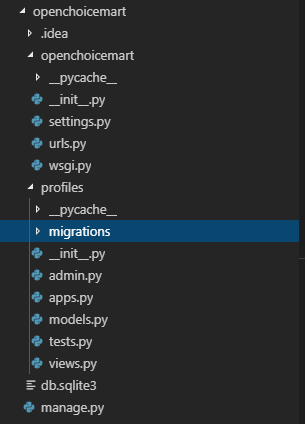
profiles app is created successfully under your Django project now.
Project Structure in Code Editor(Prefer Visual Studio Code)
Designing Profile Model
Now we are going to learn how to design the models and how it impacts on DB?
1) Open the models.py and develop the code as below
from __future__ import unicode_literals
from django.db import models
# Create your models here.
class profile(models.Model):
name=models.CharField(max_length=120)
description=models.TextField(default='Default profile description')
def __unicode__(self):
return self.name
2)Now make the migration ready
>python .\manage.py makemigrations
>python .\manage.py migrate
and then run the python server
>python .\manage.py runserver
3)Once migration is successful then verify into your respective DB.
For me, Let's verify it into MongoDB.
Just start your MongoDB servers and open DB GUI(MongoDB Compass)

Note:
There are several commands which you will use to interact with migrations and Django’s handling of database schema:
- migrate: which is responsible for applying and unapplying migrations.
- makemigrations: This is responsible for creating new migrations based on the changes you have made to your models.
- sqlmigrate: which displays the SQL statements for a migration.
- showmigrations: which lists a project’s migrations and their status.
Registering Profile model into Django Admin
One of the best features of Django is that we can manage our custom models using builtin and predefined functionalities using the Django admin page.
Then what we need to do so?
As simple as that, we need to register this model into the Django admin app.
1)Just open admin.py and develop the below piece of code.
2)Run below commands
>python .\manage.py makemigrations
>python .\manage.py migrate
and then run the python server
>python .\manage.py runserver
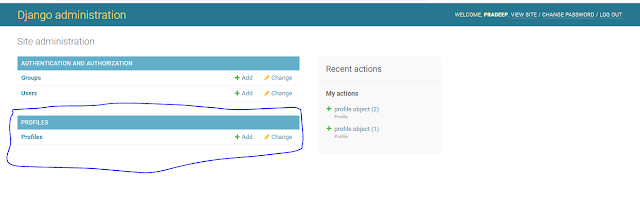
and login into the Django admin page and observer the changes.
http://127.0.0.1:8000/admin
One of the best features of Django is that we can manage our custom models using builtin and predefined functionalities using the Django admin page.
Then what we need to do so?
As simple as that, we need to register this model into the Django admin app.
1)Just open admin.py and develop the below piece of code.
from django.contrib import admin
from .models import profile
# Register your models here.
class profileAdmin(admin.ModelAdmin):
class Meta:
model = profile
admin.site.register(profile,profileAdmin)
>python .\manage.py makemigrations
>python .\manage.py migrate
and then run the python server
>python .\manage.py runserver
and login into the Django admin page and observer the changes.
http://127.0.0.1:8000/admin


